


Much more than a video editor.
Borumi helps you script, record, and edit polished videos in one place. No subscription required.
Available for macOS and Windows.


Ready for another boring screen recording? No thanks.
Thanks to Borumi's smooth cursor, automatic zooms and 4K resolution, your tutorials look polished straight out of the recorder.

Descript charges monthly and meters your media hours and AI credits. Borumi doesn't. Pay once and it’s yours for life, including updates. Over 5 years, that can save you over $1,300.
Descript Creator calculated at $24 per month, billed annually, over five years.

Borumi lets you add text, images, videos, music, and captions to your videos, without the need for an external video editor.

Stop wasting time cutting out pauses by hand. In Borumi, you can remove silences in one click, saving you hours.

Recording a whole tutorial in one take is stressful.
Borumi makes it easy to record each scene individually. This way, you can reduce mistakes and fly through the recording process.
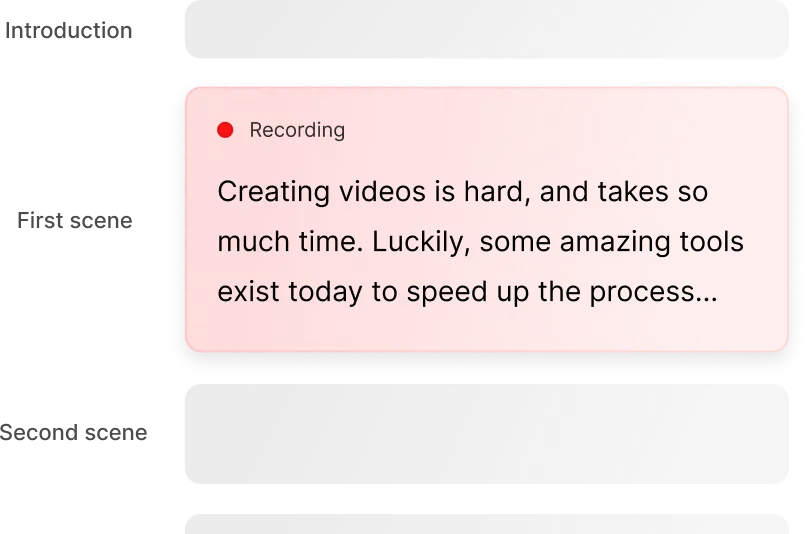

Borumi's teleprompter automatically follows your voice and shows the script for the scene you're recording, so you never get lost.

Let AI take care of the boring parts.
Connect Borumi to Claude, ChatGPT, or any other AI that supports MCP, and ask it to edit your video, add effects, and export it for you.

Need to send your video to a colleague or client?
Just click "Share video" and get a link that anyone can view. Perfect for async collaboration.
Before Borumi, I was spending (or wasting) a lot of time making videos and it was killing the motivation to create more.
Luckily, I found Borumi at the right time, and the whole experience is delightful every time I create! You should get it!
Product Engineer and Educator
Borumi makes recording and editing videos so much easier.
I've been able to double my output with the same amount of work thanks to Borumi.
Entrepreneur and Course Creator
Borumi helps me record my screen every day, whether it's for work presentations or content creation.
When I make tutorials on TikTok or YouTube, Borumi ensures high-quality screen capture with a professional, polished result — thank you, Borumi!
IT Technician and Content Creator
Comparison
| Feature | Borumi | Descript |
|---|---|---|
| Use cases | Tutorials, video courses, product demos, and content marketing. | Podcasts, interviews, social clips, and general video editing. |
| Platforms | macOS and Windows | macOS, Windows, and Chromium-based browsers |
| Pricing | One-time license for $79 with lifetime updates | Subscription, $24 per month billed annually for watermark-free 4K |
| Usage limits | No media hours or AI credits to track | Monthly media hours and AI credits |
| Recording | Multiple scenes with retakes | Record screen, camera, and microphone |
| Remote guests | Not available | Record remote participants with Rooms |
| Script editor | Script linked to your scenes | Document-style editor |
| Teleprompter | Voice-following teleprompter | Supported |
| Transcript-based editing | Supported | Supported |
| Automatic edits | Remove silences automatically | Remove silences and filler words |
| Smooth cursor movements | Supported | Not supported |
| Automatic zooms | Follow your cursor automatically | Manual zooms |
| Flexible layouts | Freely customizable canvas | Layouts and automatic speaker layouts |
| Add text, images, and music | Supported | Supported |
| Captions | Customize style and position | Supported |
| AI voices and audio cleanup | Not available | Voice cloning and Studio Sound |
| 4K exports | Supported | Creator plan and above |
| Connect your AI (MCP) | Script, edit, and export with Claude, ChatGPT, and more | Edit with Underlord, using media minutes and AI credits |
| Video sharing | Videos expire after two weeks by default | Share links |

Available for macOS and Windows
Available for macOS and Windows
Try Borumi for free, and when you're ready upgrade to the full license.
No subscriptions, no surprises. And if you're still not satisfied, we offer a 30-day money-back guarantee.
If for some reason you're unhappy with your purchase, just let us know.
Available for macOS and Windows