
Repurpose a video with AI
After recording a video for YouTube, you might want to repurpose it to publish on Instagram, TikTok, or YouTube Shorts. Instead of recording it again, you can use AI to repurpose the existing video. This guide shows you the best way to do that.


This video can't be played right now. Please try again later.
Turn a video into a vertical video
Section titled “Turn a video into a vertical video”- If you want to keep the landscape version, ask the AI to copy the project first:
- “Duplicate this project as My video — Vertical.”
- Ask for the vertical version, for example:
- “Can you convert the project to a vertical video? Adjust the style so the screen looks good. Also add captions.”
- Play the result in Borumi and ask for changes, like “Move the captions so they don’t cover my face.”
Copy the style of a video you made
Section titled “Copy the style of a video you made”The first try may not look the way you like. AI isn’t good at guessing your taste, but it’s very good at copying an example. So a great way to get good results is to point it to an existing project:
I don’t like the style. Can you check my reference project X and copy its style, layout, and pacing?
The AI opens the reference project, studies its captions, titles, layouts, and pacing, and applies them to your video.
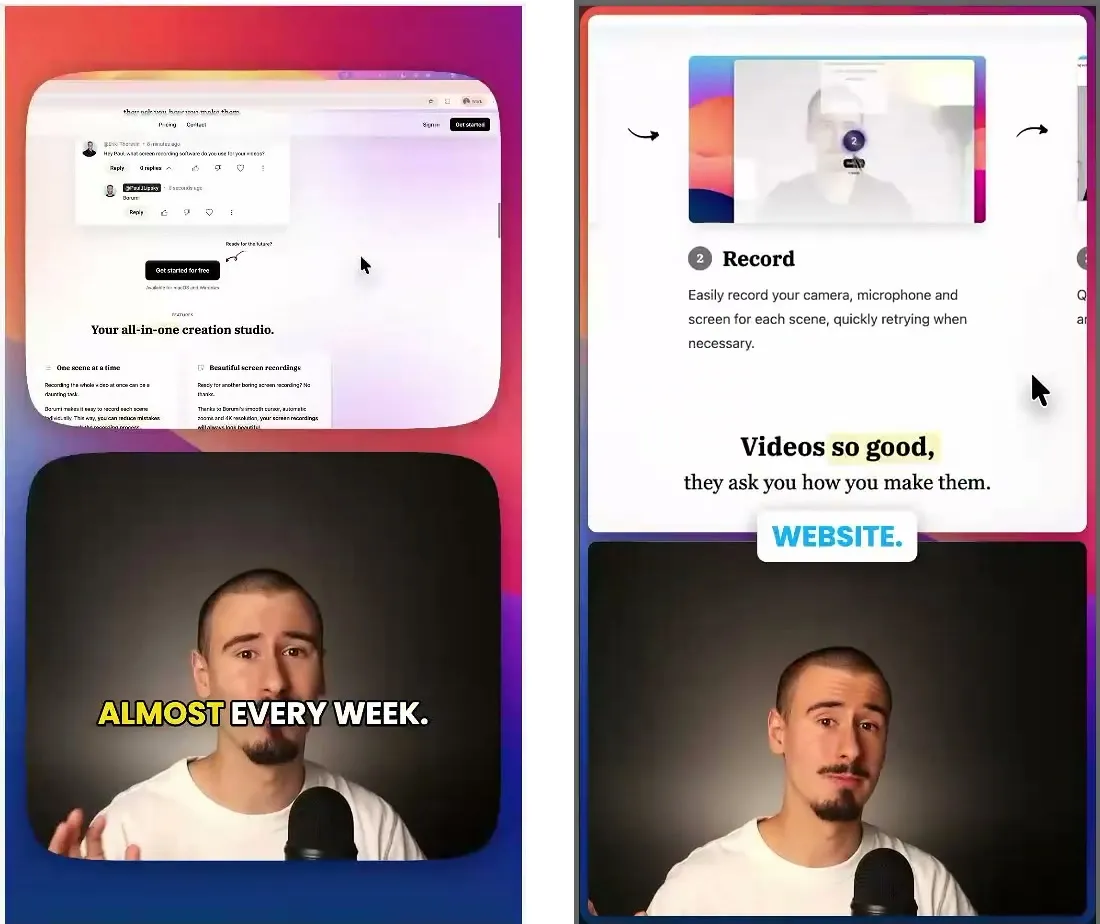
The image shows the AI’s first try on the left, and the same moment after copying a reference project on the right.
Export for each platform
Section titled “Export for each platform”At the end, you can ask the AI to export the video for each of the platforms you publish on, for example:
Can you export the video for Instagram, TikTok, and YouTube Shorts?